

Service Virtualization
Service Virtualization — a Quick and Simple Explanation
Last updated: February 2026
Can't test because an API isn't ready? Getting blocked by a flaky third-party service? Service virtualization solves this by letting you simulate the behavior of dependencies you can't—or don't want to—access directly.
What is Service Virtualization?
Service virtualization is a technique used by developers and QA teams to create a virtual version of a service that responds like the real one. The simulated API will aim to replicate the behavior of the virtualized service: request goes in, expected response comes out.
The simulation can be as simple or sophisticated as you need. A basic mock might return a hardcoded JSON response. A more advanced virtual service might maintain state across multiple requests, simulating a realistic user flow like authentication followed by a purchase.
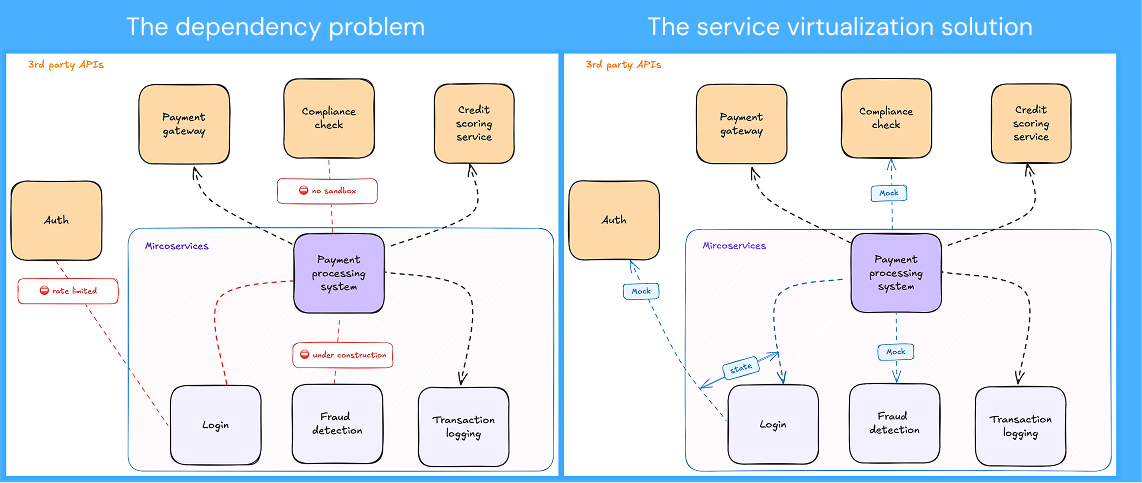
How It Works
- Identify what's blocking you: an unfinished API, an expensive third-party service, a shared environment that keeps breaking
- Capture or define the behavior: record real traffic, import an API spec, or manually define request-response pairs
- Simulate: the virtual service stands in for the real dependency during unit, integration, or load testing
- Test without constraints: since you control the simulated service, you're not bound by rate limits, per-call costs, or APIs that aren't ready yet
Mocking vs. Service Virtualization
These terms get used interchangeably, and there's real overlap between them. But in the way they're commonly used,they typically describe different points on a complexity spectrum.
API mocking usually refers to lightweight, focused simulations. You're returning canned responses for individual endpoints—often during unit testing or local development. A mock might return a static JSON payload when your code calls a specific URL. It's simple, fast to set up, and scoped to a single service.
Service virtualization traditionally covers broader, more realistic scenarios. You're simulating multiple services together, maintaining state across interactions, and recreating conditions closer to production. Instead of mocking one endpoint, you might virtualize an entire payment flow: authentication, account lookup, transaction processing, and confirmation—each step depending on the previous one.
In practice, most teams need both. A unit test might need a simple mock that returns a success response. An integration test might require a stateful simulation that handles a multi-step checkout flow with realistic error conditions.
The distinction matters less than having tools that can scale across the spectrum. You don't want separate solutions for "simple mocks" and "complex simulations"—you want one platform that handles both.
When Teams Use It
- Parallel development: frontend teams don't wait for backend APIs; they build against simulated endpoints and integrate later
- Third-party dependencies — test against payment gateways, identity providers, or shipping APIs without incurring per-call costs or hitting rate limits
- Error simulation — reliably trigger timeouts, network failures, and edge cases that are hard to reproduce with real services
- Load testing — stress-test your system without overwhelming downstream services or racking up fees
- Environment stability — replace flaky shared test environments with consistent, controllable simulations that behave the same way every time
Popular Service Virtualization Tools
1. Wiremock Cloud
Wiremock Cloud is the only cloud-native, AI-native, and fully decentralized platform to offer service virtualization at enterprise scale. The extensive feature set – including stateful mocking, AI coding agents, and chaos engineering – allows developers to test code against ultra-realistic API dependencies, while the Wiremock Runner allows teams to extend the system anywhere your code runs, such as your CI/CD pipeline or Kubernetes Cluster.
2. Broadcom DevTest
Previously known as iTKO LISA (before Broadcom’s acquisition), Broadcom DevTest is aimed at organizations with complex IT setups and legacy dependencies. The tool’s broad protocol support and multi-layer architecture capabilities must be weighed against its relatively slow evolution, desktop-IDE reliance, and recent price increases.
3. Parasoft Virtualize
Parasoft Virtualize is another tool boasting broad protocol support, recently buoyed by an AI agent that responds to natural language prompts. However, users hoping to vibe-code their way to API readiness have another thing coming – deploying this tool effectively requires a steep learning curve, and may overwhelm teams with simpler mocking needs.
4. ReadyAPI
ReadyAPI places service virtualization within a broader testing suite that covers security, performance, and functionality. Strengths such as traffic recording + replay, and centralized web UI are balanced against a relatively complex tiered licensing structure and a reliance on Groovy scripting for more complex behavior customization.
5. Tricentis Tosca
Tricentis Tosca is an entirely AI-based, codeless program that focuses predominantly on simulating delays. Despite its no-code approach, users face a significant learning curve and report hanging and lagging when using the tool in large, shared repositories.
6. Traffic Parrot
Traffic Parrot relies on Wiremock open source templating to mock APIs, services, and backend systems. Broad protocol support and automation options exist alongside limitations like single-service UI editing and a lack of dynamic file editing.
7. Hoverfly
Fast, open source, lightweight: Hoverfly’s proxy-based architecture creates realistic mocks by capturing and replaying real API traffic. However, larger teams may bemoan the lack of OpenAPI validation, schema drift detection, and limited support for stateful multi-step flows.
8. Mockoon
Lone users prioritizing speed and simplicity prize Mockoon’s desktop-first, open source approach, which requires no internet connection or account creation. However, those looking to collaborate will need to purchase a separate cloud subscription.
9. Stoplight Prism
Another tool on the lighter end of the spectrum, Stoplight Prism is geared predominantly towards OpenAPI specs. While the platform permits the automatic generation of static and dynamic mocks, it is HTTP-only and lacks features such as access control, often demanded by enterprise teams.
10. Postman Mocks
For teams already inhabiting the Postman ecosystem, Postman Mocks may seem like the natural solution for mocking needs. The tool allows you to generate mocks from collections, collaborate effectively, and simulate latencies with ease. However, the rate limit of 120 calls/minute may prove prohibitive for teams with extensive virtualization demands.
To learn more, see our full comparison of service virtualization solutions.
Bottom Line
Service virtualization removes the dependency bottlenecks that slow teams down. If a service is unavailable, expensive, or unreliable, simulate it and keep shipping. Whether you call it mocking, simulation, or virtualization, the goal is the same: isolate what you're testing from what you're not.
.png)
